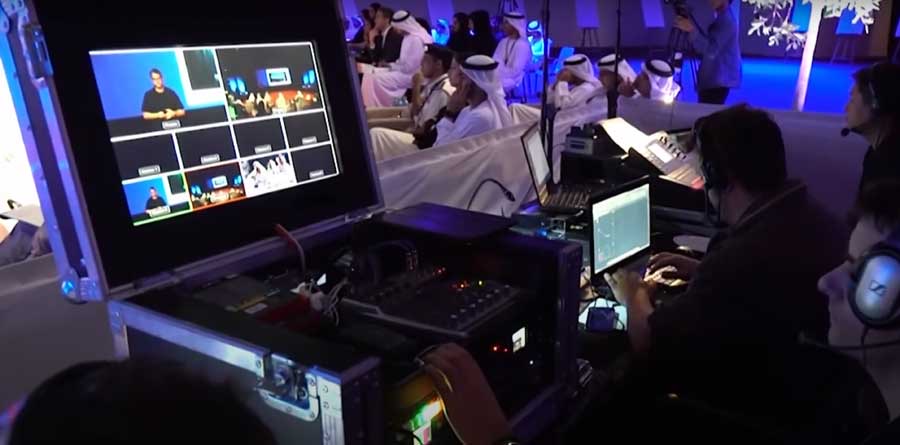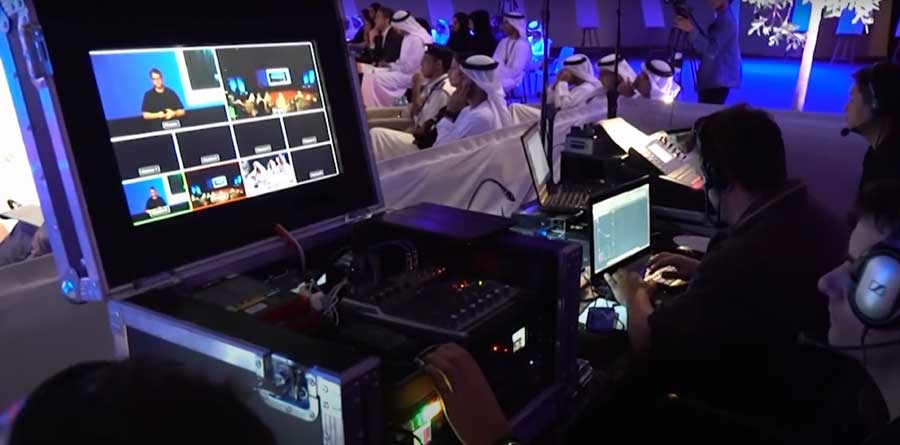
A conference produces more usable video than almost any other event: keynotes, panels, interviews in the corridor, the crowd at the opening. It also has more ways to go wrong, because everything happens once, on a fixed timetable, in a room lit for the audience rather than for cameras. This guide is for organisers who are booking a conference videographer in Dubai and want footage they will still be using next year.
Decide what the conference should give you
Start with the list of finished videos, not with cameras:
- Session recordings. Full keynotes and panels for attendees, members or an on-demand library.
- A highlight film. One to three minutes that shows the scale and the mood, for the website and next year's promotion.
- Speaker interviews. Short answers recorded away from the stage, useful for social media for months.
- Social clips. Vertical cuts of the best quotes, published during or right after the event.
- Photos. For the press release and the partners' report.
Not every conference needs all five. The difference between the first two is explained in highlight film vs full recording.
Cameras and crew
The number of cameras follows the format of the sessions:
- One speaker, one room. Two cameras: a close shot of the speaker and a wide shot of the stage, so the edit can cut between them.
- Panels. A third camera helps, because the conversation moves between people. See filming panels and fireside chats.
- Parallel tracks. Each hall needs its own setup; decide which tracks are worth recording.
- Atmosphere and interviews. A separate videographer who is free to move, so stage cameras never leave their positions.
Our guide on how many cameras an event needs covers the common setups in more detail.
Sound and slides
Viewers forgive an average picture much sooner than bad sound. Clean audio of a talk comes from the venue's or the AV company's sound desk, not from a microphone on the camera. Ask your AV supplier early for an audio feed for the video crew and name one person on their side who can help on the day.
Slides are the second half of most talks. There are two ways to include them: record the presentation feed from the AV desk, or collect the files from speakers and add them in the edit. Agree which one before the event, and tell speakers that their slides will appear in the recording.
Speakers
People speak better when they know what to expect. Tell speakers in advance that sessions are filmed, where the cameras are and whether they need to sign a release. Brief them on staying inside the lit area of the stage and repeating questions from the audience. More in preparing speakers to be filmed.
Plan interviews as appointments, not as chances: a name, a time and a quiet corner with a good background. Three to six short interviews are usually enough.
The venue
Dubai conferences take place in hotel ballrooms, exhibition halls and purpose-built conference centres, and each has its own rules:
- Access and loading. Venues set times for bringing in equipment; the crew needs passes and a place to store cases.
- Camera positions. A riser at the back of the hall keeps cameras above the audience's heads. Ask the venue or the stage builder for one.
- Light. Stage lighting, dark seating and bright LED screens are hard on cameras. A short technical rehearsal lets the crew test exposure and positions.
- Power and cables. Agree where cables run so they are safe and out of the audience's way.
A shot list built from the programme keeps all of this organised. Use our conference video shot list as a starting point.
After the conference
The value of conference video is in what happens next:
- The same day. A short clip or a few photos while people are still posting about the event. See same-day edits.
- The first week. The highlight film and the first speaker clips.
- The following months. Session recordings released one by one, quotes for social media, material for next year's campaign.
A simple publishing plan made before the event turns two days of filming into months of content. Our article on event recap content shows how.
Recording or live streaming?
Recording gives you edited films after the event; live streaming lets people watch as it happens. They need different equipment and a different crew, and many conferences use both. Compare them in recording vs live streaming an event. Live streaming is handled by our sister team, Fat Cat Live.
A short checklist
- The list of finished videos and their deadlines.
- The programme with the sessions to record marked.
- A contact at the AV company for sound and slides.
- Speaker releases and a note to speakers about filming.
- Interview names, times and a location.
- Camera positions and access times agreed with the venue.
How we work
Fat Cat Media has filmed conferences, forums and summits across the UAE since 2012. We plan the coverage from your programme, bring the crew the format needs and deliver recordings, a highlight film and clips in the formats you publish. See our conference videography service or send us your date and venue for an itemised quote.
Need help with event videography?
Conferences, launches, parties and activations: highlight films and full recordings. Send us a short brief and we will come back with an itemised quote.